

Design vs. Speed: The SEO Dilemma of Building the Perfect WordPress Blog
If you are running a WordPress blog in 2026, chances are you’ve faced one of the most common dilemmas in the blogging world:
- Should I focus on getting a beautiful, attractive blog design that keeps readers engaged and makes my site look professional?
- Or should I aim for a 100/100 PageSpeed Insights score, optimizing for speed and performance, even if it means sacrificing some visual appeal?
This design vs. speed debate has become one of the most talked-about topics among WordPress bloggers, SEO specialists, and digital marketers. On one side, a sleek, well-designed website builds trust, strengthens your brand, and improves user experience. On the other, Google and other search engines clearly prioritize fast-loading websites—and speed is one of the most important ranking factors today.
In this article, we’ll explore this dilemma in detail, weighing the pros and cons of design vs. speed in SEO, what experts say about this balance, and how you can build a WordPress blog that gives you the best of both worlds.
Why Blog Design Matters
1. First Impressions Count
According to a study from Stanford University, 75% of users admit to making judgments about a website’s credibility based on its design (Stanford Persuasive Tech Lab). A visually appealing WordPress blog instantly communicates professionalism, trustworthiness, and authority.
If your blog looks outdated, cluttered, or poorly designed, visitors are more likely to bounce—even if your content is excellent. In fact, research from Adobe suggests that 38% of people will stop engaging with a website if the content or layout is unattractive (Adobe, 2015).
2. Branding and Recognition
An attractive WordPress theme is more than decoration—it’s part of your brand identity. Fonts, color schemes, imagery, and layout all contribute to making your blog memorable. If readers enjoy the design, they are more likely to return and share your posts.
3. Engagement and Conversion
Design impacts:
- Readability: Good typography and spacing keep users reading longer.
- Navigation: A clear design helps users find content quickly.
- Conversion rates: Buttons, call-to-actions, and forms perform better when integrated into a thoughtful layout.
4. Social Sharing
A visually appealing blog is more shareable. Attractive images, clean layouts, and modern aesthetics make readers more likely to share your posts on social media, giving you indirect SEO benefits through traffic and backlinks.
👉 In short: A great design improves trust, engagement, and user satisfaction—factors that indirectly impact SEO.
Why Speed Matters
1. Google’s Ranking Factor
Since 2010, Google has officially considered page speed as a ranking factor. With the introduction of Core Web Vitals in 2021, speed became even more important. Websites that load slowly not only frustrate users but also risk being pushed down in search results.
2. User Behavior and Bounce Rates
According to Google research, as page load time increases from 1 second to 3 seconds, the probability of bounce increases by 32%. At 5 seconds, bounce probability jumps to 90% (Think with Google).
This means: even if your design is perfect, if your site takes too long to load, most visitors will never even see it.
3. Mobile-First Indexing
With mobile traffic accounting for more than 55% of global web usage (Statista, 2025), speed on smartphones has become critical. A heavy WordPress theme with high-resolution images may look amazing on desktop, but if it lags on mobile, you’ll lose traffic and rankings.
4. Conversion Rates and Revenue
Amazon once famously calculated that a 100ms delay in load time could cost them 1% in sales (Greg Linden, Amazon engineer, via O’Reilly). For bloggers monetizing with ads, affiliates, or products, speed translates directly into higher conversions and revenue.
👉 In short: Speed is not just an SEO factor—it directly impacts user experience, conversions, and your blog’s bottom line.
The Core Dilemma: Design vs. Speed
Here’s where things get tricky:
- A beautiful design often requires large images, animations, custom fonts, and plugins, which can slow down your site.
- A 100/100 PageSpeed Insights score often means stripping down to minimal themes, fewer plugins, and simplified design—sometimes leaving your blog looking bland and generic.
So, what should WordPress bloggers prioritize?
What Experts Say
John Mueller (Google Search Advocate)
John Mueller has repeatedly stated that speed is important but not the only ranking factor. In one Google Webmaster Central Hangout, he explained:
“Fast sites make users happy, but that doesn’t mean the fastest site automatically ranks #1. Content relevance and quality remain more important.”
(Source: Google Webmaster Hangouts, 2020)
Neil Patel (Digital Marketer)
Neil Patel emphasizes the balance:
“A clean, attractive design will keep people on your site, but speed will bring them there in the first place. You need both to succeed.”
(Source: Neil Patel Blog)
WPBeginner (WordPress Authority Blog)
WPBeginner suggests using lightweight themes like Astra or GeneratePress, which combine modern design with speed optimization. They argue that you don’t have to sacrifice aesthetics if you choose the right tools.
(Source: WPBeginner Theme Recommendations)
SEO: Which Matters More—Design or Speed?
The Case for Speed
- Direct ranking factor in Google.
- Affects bounce rates and time-on-site.
- Essential for mobile performance.
The Case for Design
- Affects credibility, branding, and user trust.
- Improves engagement and conversion rates.
- Encourages backlinks and social shares.
The Reality: User Experience First
Google has been clear that its goal is to reward websites that provide the best user experience. Both design and speed are components of user experience.
If your site is fast but looks outdated or untrustworthy, users will leave. If your site looks great but loads slowly, users will never see it.
👉 The answer isn’t design vs. speed—it’s design + speed, with balance.
How to Balance Design and Speed in WordPress
Here are practical strategies to get the best of both worlds:
1. Choose a Lightweight Theme
- Recommended options: Astra, GeneratePress, Kadence, Neve.
- These themes prioritize speed while offering flexibility for customization.
2. Optimize Images Without Sacrificing Quality
- Use tools like ShortPixel, Imagify, or Smush.
- Serve images in WebP format.
- Implement lazy loading so images only load when visible.
3. Limit Plugins
Each plugin adds weight. Keep only essential ones and avoid bloated builders when possible.
4. Use a Content Delivery Network (CDN)
CDNs like Cloudflare or BunnyCDN distribute content globally for faster delivery.
5. Optimize Fonts and Scripts
- Use system fonts or limit Google Fonts.
- Defer JavaScript loading.
- Minify CSS and JS with tools like Autoptimize or WP Rocket.
6. Test Regularly
Use:
- Google PageSpeed Insights (for Core Web Vitals).
- GTmetrix (for waterfall analysis).
- Pingdom (for real-world load times).
7. Mobile-First Design
Always test your blog on mobile. A design that looks amazing on desktop but breaks on mobile can destroy SEO performance.
Real-World Examples
- Minimalist Blogs: Many successful bloggers use simple, clean themes with optimized typography. Their design looks professional without relying on heavy elements.
- Media-Rich Blogs: Lifestyle and travel bloggers often use lots of photos. They maintain speed by compressing images and using CDNs.
- Corporate Blogs: Companies often choose branded, custom designs but hire developers to ensure performance is optimized under the hood.
The Middle Ground: Prioritize Core Web Vitals While Maintaining Design
In 2025, it’s no longer about choosing design OR speed. Instead, it’s about designing with speed in mind.
Google’s Core Web Vitals (Largest Contentful Paint, First Input Delay, and Cumulative Layout Shift) measure how real users experience your site. A design that meets these metrics will both look good and perform fast.
Here’s a ready-to-use table you can add to your blog post:
🔹 WordPress Blog Setup: Design vs. Speed
| Aspect | Design-Focused Setup | Speed-Focused Setup | Balanced Approach (Recommended) |
|---|---|---|---|
| Theme Choice | Premium multipurpose themes (e.g., Divi, Avada, Salient) with heavy design elements | Lightweight frameworks (e.g., Astra, GeneratePress, Neve) | Lightweight but flexible themes (e.g., Kadence, Blocksy) |
| Plugins | Multiple design plugins (sliders, animations, visual effects) | Minimal plugins (performance boosters only) | Essential SEO + performance + selective design plugins |
| Page Builders | Elementor, Divi Builder, WPBakery (can slow down site) | Gutenberg/Block Editor only (lightweight) | Gutenberg with selective lightweight addons (e.g., Kadence Blocks) |
| Images & Media | High-res images, background videos, large carousels | Compressed images, minimal animations, lazy loading | Optimized WebP images, lazy loading, CDN delivery |
| Fonts & Icons | Custom Google Fonts, heavy icon packs | System fonts, minimal styling | Limited Google Fonts (preloaded), SVG icons |
| Performance Score | Lower (50–75 on PageSpeed Insights) | Higher (90–100 on PageSpeed Insights) | Balanced (80–90+ on PageSpeed Insights) |
| User Experience | Visually stunning, but may lag on mobile | Very fast, but may look plain | Modern design that loads quickly |
| SEO Impact | Strong brand trust, but risk of high bounce rates due to slow loading | Higher rankings from speed, but weak engagement if design is too basic | Best SEO impact: balance speed + engaging design |
| Best Use Case | Portfolios, creative agencies, lifestyle blogs | News blogs, tech blogs, minimalist bloggers | Professional blogs, business sites, affiliate blogs |
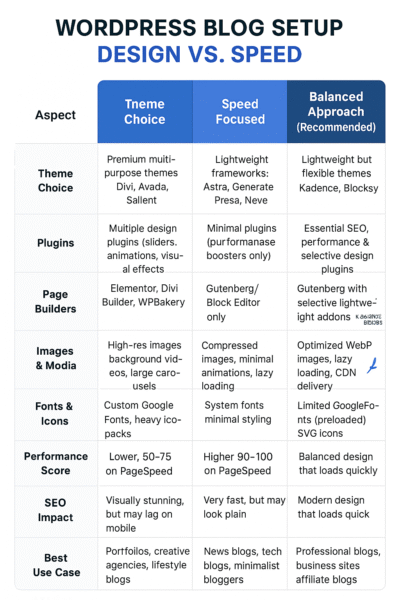
👉 Takeaway:
- If your priority is branding & aesthetics, lean toward design—but keep optimization in mind.
- If your priority is traffic & rankings, lean toward speed—but don’t make it so plain that users bounce.
- For long-term SEO & user retention, the balanced approach is almost always best.
Conclusion
So, what is more relevant for SEO: design or speed?
The answer is both—but with a caveat:
- Speed is the foundation. If your blog is painfully slow, no amount of design brilliance will save it.
- Design is the differentiator. Once your site is fast enough to satisfy Google’s Core Web Vitals, design becomes the factor that engages readers, builds trust, and drives conversions.
👉 Practical takeaway: Aim for a PageSpeed Insights score of at least 85+, while keeping a design that reflects your brand and engages your audience. Don’t obsess over hitting 100/100 if it means stripping away all visual appeal.
As SEO expert Brian Dean from Backlinko puts it:
“Great content and user experience win rankings. Speed helps, design helps—but balance is the ultimate SEO strategy.”
(Source: Backlinko)
References and Attributions
- Stanford University Persuasive Technology Lab – Website Credibility Research
- Adobe, “The State of Content” Report, 2015
- Think with Google – Mobile Page Speed Study
- Statista – Global Mobile Internet Usage 2025
- Greg Linden, Amazon Performance Impact Study
- Google Webmaster Hangouts – John Mueller Statements
- Neil Patel Blog – SEO & UX Insights
- WPBeginner – Recommended Lightweight Themes
- Backlinko – SEO & User Experience
Frequently Asked Questions – Design vs. Speed in WordPress
Yes. Google uses Core Web Vitals as a ranking factor, so faster sites generally perform better in search results. However, speed alone won’t secure top rankings—content relevance and user experience matter more.
Absolutely. By using lightweight themes (like Astra, GeneratePress, or Kadence), optimizing images, and limiting unnecessary plugins, you can achieve both a modern design and high performance.
Not necessarily. Aiming for 85+ is usually enough to satisfy SEO requirements. Stripping down your design for a perfect score can harm user trust and engagement, which also impacts SEO.
Speed is the foundation, ensuring users stay on your site. Design is the differentiator, helping build trust and engagement. The best SEO strategy balances both.
Some popular tools include WP Rocket, Autoptimize, ShortPixel/Imagify for image optimization, and Cloudflare CDN for faster global delivery.